
Async Prompts
LLM calls can take time — sometimes several seconds, sometimes longer, depending on the complexity of the prompt and the size of the context. Waiting for the result in a synchronous processing step is not always acceptable, especially when a user is actively working with the process instance. Dynamixs.AI solves this by leveraging a built-in Imixs Workflow mechanism: Async Events.
Asynchronous LLM Calls
When a BPMN Event with an OpenAIAPIAdapter is processed synchronously, the entire workflow transaction blocks until the LLM returns a response. For a user submitting a form or triggering an action, this means waiting — with no feedback and no ability to continue working. For complex prompts or large file contexts, this wait can easily stretch to tens of seconds.
An Async Event in Imixs Workflow is a BPMN Boundary Event that is executed after the current processing life cycle has completed and the process instance has already been persisted in its new state. This means the user gets an immediate response — the process moves forward — and the LLM call happens in the background.
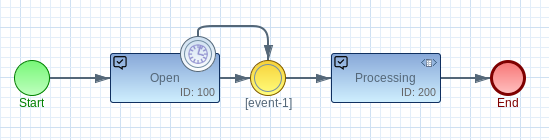
The flow works like this:
- The user triggers an action — for example, uploading a document and submitting a task.
- The process instance is immediately saved in its new status. The user is done and free to continue.
- In the background, the AsyncEventProcessor picks up the pending event and executes the LLM call.
- The LLM result is written back into the process instance as a named data field — ready for the next step in the process.
Modelling an Async LLM Call
In the BPMN model, an Async Event is modelled as a Timer Boundary Event attached to a Task. The timer value defines the delay before the event is executed — for immediate background processing, a short value like 1000 (milliseconds) is typically sufficient.
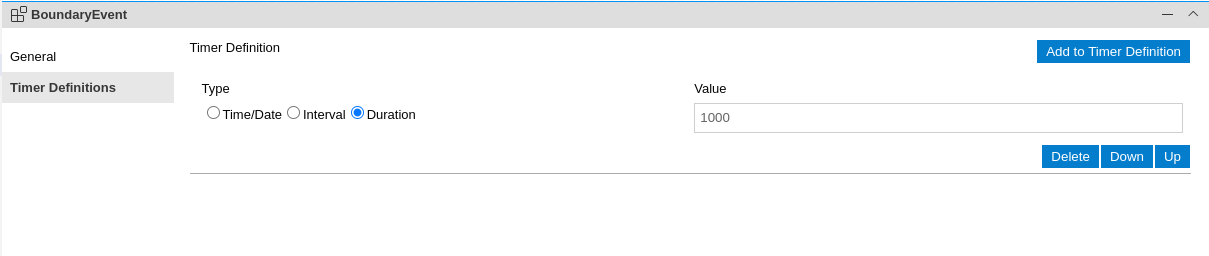
The OpenAIAPIAdapter is then configured on this Boundary Event — exactly as described in the How to Prompt section. From the adapter's perspective, nothing changes. The only difference is when the event is processed: asynchronously, in a separate transaction, after the user has already moved on.
Important: The Transaction ID
The AsyncEventProcessor uses a $transactionID to ensure that a pending async event is only executed if the process instance is still in the exact state it was in when the event was scheduled. If the user or another process step has since modified the instance, the async event is automatically discarded.
This safety mechanism prevents stale LLM calls from overwriting newer data — an important consideration in collaborative or multi-step processes.
Configuration
The AsyncEventProcessor is enabled and configured via environment variables on the platform:
| Variable | Description |
|---|---|
ASYNCEVENT_PROCESSOR_ENABLED |
Must be set to true to activate the processor (default: false) |
ASYNCEVENT_PROCESSOR_INTERVAL |
Polling interval in milliseconds |
ASYNCEVENT_PROCESSOR_INITIALDELAY |
Delay before the processor starts after application boot |
ASYNCEVENT_PROCESSOR_DEADLOCK |
Lock expiration time in milliseconds (default: 1 minute) |
This configuration is typically handled once by the platform administrator and does not need to be repeated per process model.