
The AI Assistant Adapter
The org.imixs.llm.workflow.ImixsAIAssistantAdapter is an alternative to the OpenAIAPIAdapter, designed for more complex process scenarios where a single prompt template is not sufficient. Instead of defining the entire prompt in one Data Object, the Assistant Adapter splits the prompt across multiple BPMN model elements — keeping the AI behaviour clean, modular and easy to maintain.
The Problem with Flat Prompt Templates
For simple use cases, a single prompt definition on a BPMN Event works well. But in more complex business processes, the same AI assistant needs to:
- Maintain a consistent identity and role throughout the entire process
- Adapt its specific instructions depending on what is happening at each individual step
Putting all of this into a single flat prompt template quickly becomes unwieldy — and makes it hard to update one aspect without touching the rest.
Two Template Layers
The Assistant Adapter solves this by combining two separate prompt layers, each defined in its own BPMN Data Object:
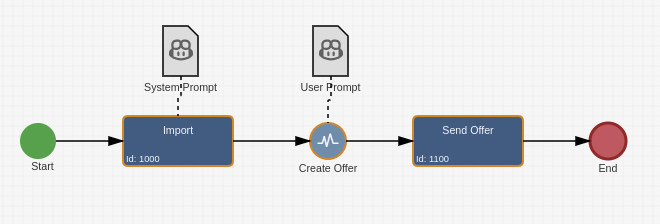
Task Template — associated with a BPMN Task
This template defines the AI's system role. It describes who the assistant is, what the overall process goal is, and what actions are available. This is the “WHO am I, WHAT do I do, HOW do I work” layer. It is defined once per task and stays consistent across all events within that task.
Event Template — associated with a BPMN Event
This template contains the specific instructions for the current action — what the assistant should do right now, enriched with relevant business data from the process instance. This is the “WHAT should I do NOW” layer. It changes with every event and focuses purely on the current step.
Both templates can reference live process data via <itemvalue> tags and file content via <FILECONTEXT> tags, exactly as described in the How to Prompt section.
How the Prompt Is Assembled
At runtime, the Assistant Adapter combines both templates into a single OpenAI-compatible message structure:
"messages": [
    {
        "role": "system",
        "content": "<Task Template content>"
    },
    {
        "role": "user",
        "content": "<Event Template content>"
    }
]
This maps directly to the standard OpenAI chat format — the Task Template becomes the system message that sets the context, and the Event Template becomes the user message that drives the current interaction.
Configuration
The Assistant Adapter is configured in the Workflow Result of the BPMN Event, in the same way as the OpenAIAPIAdapter:
<imixs-ai name="ASSISTANT">
  <endpoint>http://openai-api-server/</endpoint>
  <result-item>request.response.text</result-item>
  <result-event>JSON</result-event>
</imixs-ai>
The name="ASSISTANT" attribute activates the Assistant Adapter. The result-item field stores the full message history of the conversation — making it available to subsequent process steps and user interfaces.
When to Use the Assistant Adapter
Use the ImixsAIAssistantAdapter when your process requires a consistent AI persona across multiple steps, and each step needs its own specific instructions. A typical example is a customer request process where the AI assistant always plays the role of a service agent, but the concrete task — analysing an incoming request, drafting a reply, or summarising a resolution — changes at each step.
Use the OpenAIAPIAdapter for simpler, self-contained LLM calls where a single prompt template is sufficient.