
The RAG System
Retrieval-Augmented Generation (RAG) allows a language model to answer questions based on your own business data — not just its training knowledge. Instead of asking a general-purpose LLM what it knows, you give it relevant context retrieved from your own knowledge base, and it generates a response grounded in that data.
Dynamixs.AI includes a fully integrated RAG system built on Apache Cassandra, designed to grow with enterprise data demands while maintaining fast query performance. What makes it particularly powerful is its deep integration with the workflow engine: the knowledge base is not a static index — it is a living, process-aware store that automatically reflects the current state of your business data.
The Core Idea: Process-Aware Indexing
The Dynamixs.AI RAG system does not only index relevant business content but also its state. Every indexed document carries the workflow status of the process instance it belongs to — and that status is automatically updated whenever the process moves forward.
This means you can query the knowledge base not just by content, but also by business context. When searching for contracts, for example, you can explicitly limit results to currently valid contracts — and exclude those that have been cancelled or superseded — simply by filtering on the workflow status at retrieval time.
Example: A contract document is indexed when it is approved. When the contract is later terminated, the process moves to a new status — and the RAG index is updated automatically in the background. A retrieval query looking for “valid contracts with supplier X” will no longer return the terminated contract, without any manual intervention.
Integration
Working with the RAG system involves two steps — the indexing phase where your business data is stored into the knowledge base, and the retrieving phase where relevant context is retrieved from your knowledge base at the right point in your process. Both are modelled directly in BPMN using dedicated adapter classes.
org.imixs.ai.rag.workflow.RAGIndexPlugin— handles creating, updating, and deleting embeddings in the knowledge baseorg.imixs.ai.rag.workflow.RAGRetrievalAdapter— handles retrieval queries against the knowledge base
Before any indexing or retrieval can take place, the corresponding plugin class need to be registered in the Plugin List of your BPMN workflow model. Open the Workflow Properties of your process and add the plugin class org.imixs.ai.rag.workflow.RAGIndexPlugin:
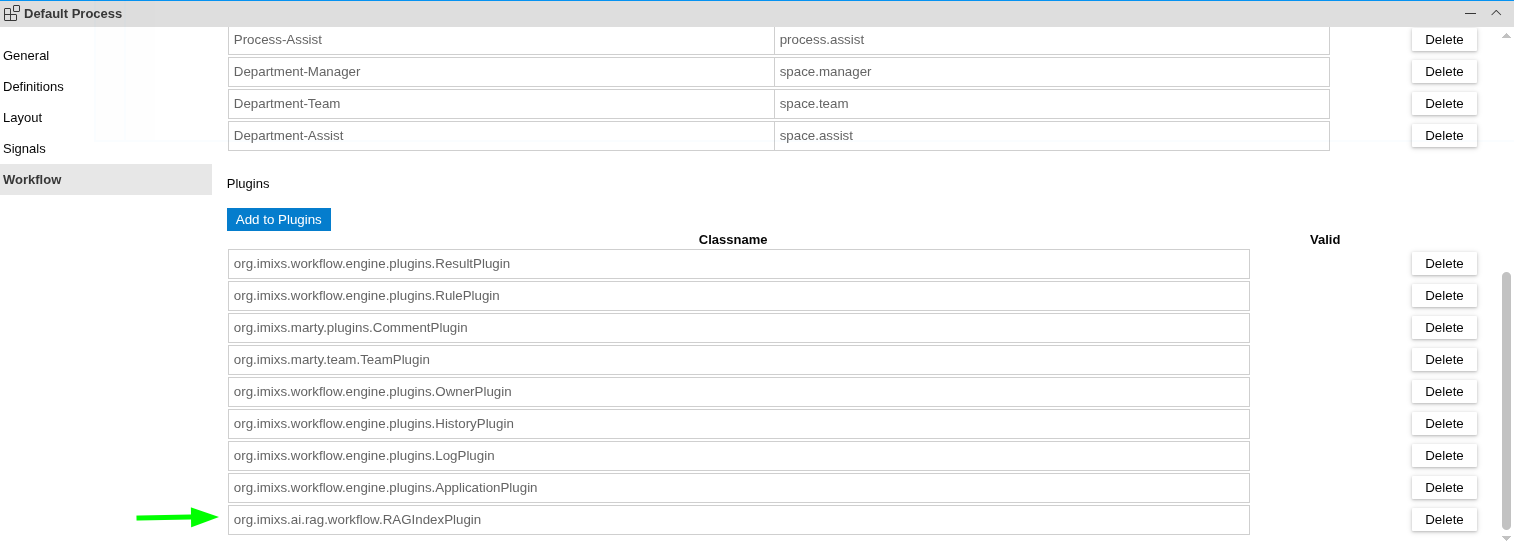
Once registered, both classes are active for every processing cycle in that model. Their behaviour at each individual event is then controlled through the Workflow Result configuration of that event — as described in the sections below.
Indexing
The org.imixs.ai.rag.workflow.RAGIndexPlugin creates, updates, and deletes embeddings in the knowledge base. It is configured in the Workflow Result of a BPMN Event using name="INDEX":
<imixs-rag name="INDEX">
  <endpoint-embeddings>my-rag</endpoint-embeddings>
  <category>contracts</category>
  <debug>true</debug>
</imixs-rag>
The content that gets indexed is defined in a PromptDefinition Data Object associated with the same Event — exactly the same pattern used for LLM prompts. This means the full power of dynamic placeholders is available: <itemvalue> tags, <FILECONTEXT> for file attachments, and any other text adapter:
<PromptDefinition>
  <prompt>
    <itemvalue>$workflowgroup</itemvalue>: <itemvalue>$workflowstatus</itemvalue>
    <itemvalue>$workflowsummary</itemvalue>
    # Summary
    <itemvalue>$workflowabstract</itemvalue>
  </prompt>
</PromptDefinition>
At indexing time, the placeholders are resolved against the current process instance, and the resulting text is converted into a vector embedding and stored in the knowledge base together with the workflow metadata.
Automatic Status Updates
The RAGIndexPlugin automatically keeps the workflow metadata in sync. Every time a process instance is processed — regardless of whether the event explicitly triggers a re-index — the RAGIndexPlugin updates the stored $workflowGroup and $taskId for that instance. This ensures the retrieval filters always reflect the current process state.
To disable this automatic update for a specific event, add the following to its Workflow Result:
<imixs-rag name="DISABLE"></imixs-rag>
Indexing AI-Generated Content
In addition to indexing raw process data, the PROMPT mode allows you to first generate a summary or analysis using a completion endpoint, and then index the AI-generated result as the embedding. This is useful when you want the knowledge base to contain enriched, processed content rather than raw field values:
<imixs-rag name="PROMPT">
  <endpoint-completion>http://openai-api-completions/</endpoint-completion>
  <endpoint-embeddings>http://openai-api-embeddings/</endpoint-embeddings>
</imixs-rag>
Deleting an Index
When a process instance is deleted from the database, its embeddings are automatically removed from the knowledge base. To explicitly delete the index for a specific event — for example when a document is formally withdrawn — use name="DELETE":
<imixs-rag name="DELETE"></imixs-rag>
Retrieval
The org.imixs.ai.rag.workflow.RAGRetrievalAdapter searches the knowledge base for entries semantically similar to a given query and returns a list of matching process instance references. It is recommended to model RAG events in an asynchronous way (see the section Async Events).
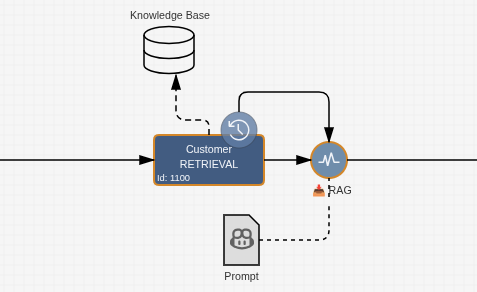
The RAGRetrievalAdapter is configured in the Workflow Result of the corresponding BPMN Event using name="RETRIEVAL":
<imixs-rag name="RETRIEVAL">
  <endpoint-embeddings>http://openai-api-server/</endpoint-embeddings>
  <reference-item>product.ref</reference-item>
  <max-results>5</max-results>
  <modelgroups>Contract</modelgroups>
  <tasks>1200</tasks>
  <debug>true</debug>
</imixs-rag>
You can specify exactly which data should be used for the retrieval phase.
| Property | Type | Description |
|---|---|---|
endpoint-embeddings |
URL | The embeddings endpoint used to vectorize the query |
reference-item |
Text | Process variable where the list of matching $uniqueID references is stored |
max-results |
Number | Maximum number of results to return |
modelgroups |
Text | Filter by workflow group — e.g. only search within Contract processes |
tasks |
Number | Filter by task ID — e.g. only return instances currently at task 1200 (valid/active status) |
debug |
Boolean | Optional — logs retrieval details |
The modelgroups and tasks filters are where the process-awareness of the RAG system becomes directly useful in the model. By specifying a task ID that corresponds to the “active” or “valid” state of a process, you ensure that only currently relevant documents are considered — automatically excluding cancelled, expired, or superseded entries.
The Retrieval Query
The query used for semantic search is — again — defined in a PromptDefinition Data Object connected to the Event. The same dynamic placeholder mechanisms apply:
<PromptDefinition>
  <prompt><![CDATA[
    <itemvalue>request.subject</itemvalue>
    <FILECONTEXT>^.+\.eml$</FILECONTEXT>
  ]]></prompt>
</PromptDefinition>
In this example, the subject line of the current request and the content of any attached email files are combined into the retrieval query. The system finds all indexed entries that are semantically similar and returns their process instance IDs in the configured reference-item field.
Putting It Together
A typical RAG-enabled process in Dynamixs.AI works like this:
- Index — When a contract is approved, an indexing event stores the contract content and metadata as a vector embedding, tagged with the current workflow status.
- Auto-update — As the contract moves through its lifecycle (renewal, amendment, termination), the workflow metadata in the index is updated automatically.
- Retrieve — When a new request arrives, a retrieval event searches the knowledge base for semantically relevant contracts — filtered to only those currently in an active status.
- Generate — The retrieved contract references are passed to an LLM prompt as context, enabling the model to generate a response grounded in the actual, current contract data.